코딩 기록/Kotlin
kotlin 원하는 이미지파일 android 화면에서 배경으로 설정하는 방법 android:background
NomadHaven
2022. 2. 7. 02:04
폴더 및 파일 설정
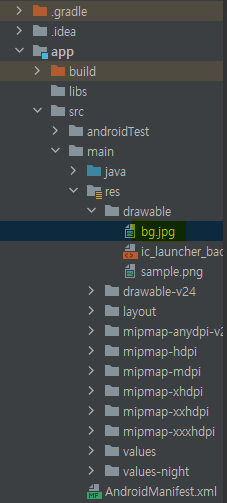
본인이 배경으로 지정하고 싶은 이미지파일 bg.jpg를 drawble폴더에 저장
activity_main.xml
<?xml version="1.0" encoding="utf-8"?>
<androidx.constraintlayout.widget.ConstraintLayout
        xmlns:android="http://schemas.android.com/apk/res/android"
        xmlns:tools="http://schemas.android.com/tools"
        xmlns:app="http://schemas.android.com/apk/res-auto"
        android:layout_width="match_parent"
        android:layout_height="match_parent"
        android:background="@drawable/bg"
        tools:context=".MainActivity">
<!--    <ImageView
            android:layout_width="832dp"
            android:layout_height="380dp" app:srcCompat="@drawable/sample" android:id="@+id/imageView"
            app:layout_constraintTop_toTopOf="parent"
            app:layout_constraintBottom_toBottomOf="parent" app:layout_constraintEnd_toEndOf="parent"
            app:layout_constraintStart_toStartOf="parent"
            app:layout_constraintVertical_bias="0.443"/>-->
    <Button
            android:text="Button"
            android:layout_width="wrap_content"
            android:layout_height="wrap_content" android:id="@+id/button"
            app:layout_constraintTop_toTopOf="parent"
            app:layout_constraintBottom_toBottomOf="parent" app:layout_constraintStart_toStartOf="parent"
            app:layout_constraintEnd_toEndOf="parent"
    />
</androidx.constraintlayout.widget.ConstraintLayout>
8번째줄을 통해 drawble폴더에 있는 bg 파일을 배경으로 지정
android:background="@drawable/bg"
결과화면

이미지파일이 문제없이 배경으로 지정된다.
지정된 배경 위에 button이 생성된다.